Home › Real estate investor CRM
D4D CRM
A real estate investor CRM that analyzes the deal, not just the contact.
Seller pipeline, comps, underwriting and follow-up in one place. D4D CRM is ours—not a reseller license—and it is included with every caller seat.
From lead to decision
The lead lands. The deal gets analyzed before it goes cold.
Seller pipeline
Calls and Meta forms feed one pipeline, so ownership, stage and next action stay visible.
One-click comps
Pull comparable properties and estimate ARV, as-is value, rent and price per square foot.
Built-in deal analysis
Compare wholesale, fix and flip, wholetail, rental and seller-finance strategies.
Follow-up in context
Keep seller details, property facts, source and the next action together.
Auditable underwriting
AI comps, not a Zestimate.
Comparable selection, adjustments and ARV reasoning you can audit, with the logic shown. Enter the property, run the numbers and see which exit actually makes sense.
- Comparable selection shownReview which properties informed the analysis instead of accepting a hidden estimate.
- Offer range and risksSee target-offer logic, strengths, risks and the questions that still need answers.
- A clear next moveGet an AI verdict and seller-call direction tied to the deal facts.
Read the CRM comparison guide →
Open D4D CRM ↗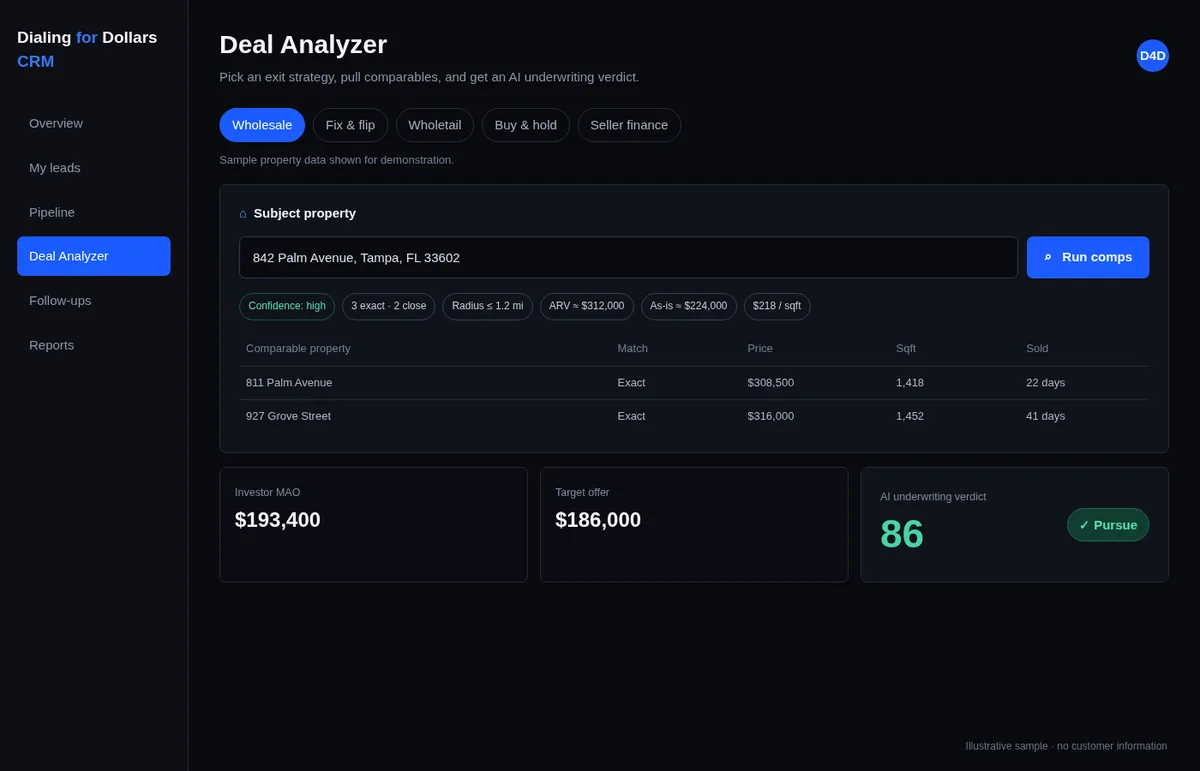
1842 Franklin Ave
Columbus, OH 43205
Strong wholesale spread. Verify roof condition, then open at $128K.
One acquisition record
Calls and ads feed the same seller pipeline.
A lead should not lose its source, property context or next step when it moves from marketing to acquisitions.
From cold calling
- ✓ Qualification notes and seller motivation
- ✓ Property condition, timing and price
- ✓ Recording attached to the lead
From Meta ads
- ✓ Form details and campaign source
- ✓ One follow-up workflow
- ✓ The same deal-analysis process
Comparison
A general CRM tracks the contact. This one underwrites the deal.
Most investor teams run a generic sales CRM next to a spreadsheet of comps. The record and the numbers live apart, so the decision happens late.
A generic sales CRM
- × Stores the contact, not the property
- × Comps pulled in a separate tool, pasted into notes
- × ARV and exit strategy live in a spreadsheet
- × The caller cannot run numbers during the call
- × Source is lost when the lead is reassigned
D4D CRM
- ✓ Seller, property and next action on one record
- ✓ One-click comps with the selection shown
- ✓ ARV, as-is, rent and price per square foot estimated in place
- ✓ Wholesale, flip, wholetail, rental and seller finance compared side by side
- ✓ Calling and Meta leads in one pipeline with source intact
Walkthrough
How a deal gets analyzed
The lead lands
A call or a Meta form creates the record with the seller, the property and the source attached.
Comps pull
Comparable properties are selected and shown, with the adjustments that informed the estimate.
Numbers estimated
ARV, as-is value, rent and price per square foot are calculated from that comparable set.
Exits compared
Wholesale, fix and flip, wholetail, rental and seller finance are run side by side on the same property.
A verdict and a next call
You get a target-offer range, the risks, the open questions and a clear direction for the next seller conversation.
Illustrative of the workflow. Numbers depend on the property, the market and the comparable data available.
Questions
Frequently asked questions
Is D4D CRM included or does it cost extra?
It is included with every caller seat. It is our own software, not a reseller licence on somebody else's platform.
How is it different from a general CRM?
A general CRM tracks the contact. D4D CRM also analyses the deal: one-click comps, ARV and as-is estimates, rent and price per square foot, and a strategy comparison across wholesale, fix and flip, wholetail, rental and seller finance.
Where do the comps come from and can I check them?
Comparable selection, the adjustments applied and the ARV reasoning are all shown, so you can audit which properties informed the analysis instead of accepting a single hidden estimate.
Does it work on a phone?
Yes, on iOS, Android and the web, so a caller or acquisitions manager can pull the numbers during the seller conversation rather than after it.
Can it hold leads from both calling and ads?
Yes. Calls and Meta form submissions feed the same seller pipeline with their source, property context and next action intact, which is what makes one weekly scorecard possible across both channels.
Free download
The deal analysis worksheet we use on seller calls
One printable page: comps, ARV, repairs, holding and closing costs, your fee, and the maximum allowable offer formula printed on the sheet.
- Fill it in while the seller is still on the phone
- Every blank is the next question to ask
- Ends in a go / follow up / pass decision
It's yours.
The worksheet should have opened in a new tab. If your browser blocked it, use the button below.
Download the worksheetKeep the lead and the numbers in one place.
See how calling, ads and deal analysis fit the same acquisition workflow.
See where your deal flow is leakingSee where it's leaking